Club Falligan

- Service
- Custom WordPress development
Connecting members, events and the team organising them.
For Club Falligan in Ghent, we are developing WordPress into a tool for managing club life. A dedicated events extension connects registrations, guests and communications. The members’ area and administration features are adapted so everyone can find the information relevant to their role.
Context
The Club Falligan website presents the club and its activities, but also supports communication with members. To organise an event, the team needs to know the participants and their guests, account for available places, track responses and have the information needed for preparation.
These needs call for rules specific to the club: registration periods, participant options, prices, payment methods and communications based on responses received. Our work focuses on these business journeys, with custom development integrated into WordPress and the existing members’ area.
Testimonial
« Jean-Charles supports us in developing the Club Falligan website with tools suited to club life. The developments connect member management, activity registrations and communications. We can track participants and their guests, and have tools to prepare our invitations. We are very satisfied with his services! »
Translated from French.
How we got there
Giving each event its own rules
The extension brings together practical information, registration opening and closing dates, capacity, prices and options. It also handles guest admission and the number allowed. These settings drive the registration journey and capacity tracking.
Connecting participation to the team’s work
A registration connects a person to an event, with their choices, guests and a payment or participation status. The administration brings this information together in a table filterable by activity. The team can edit registrations and export the list to prepare the event, distinguishing in particular between bank-transfer and on-site payments.
Adapting member management
A dedicated form lets the team create a member from the management tool and invite them to choose a password. Name particles are supported. The personal area, built with Ultimate Member and extended through custom development, provides access to the member’s registrations and documents made available by the club.
Preparing and tracking communications
The team prepares invitations, checks the message and chooses recipients based on their response: registered participants, people who declined or members who have not replied. It can also compose a free-form message with activities or news. A history tracks sending attempts and errors so specific recipients can be retried.
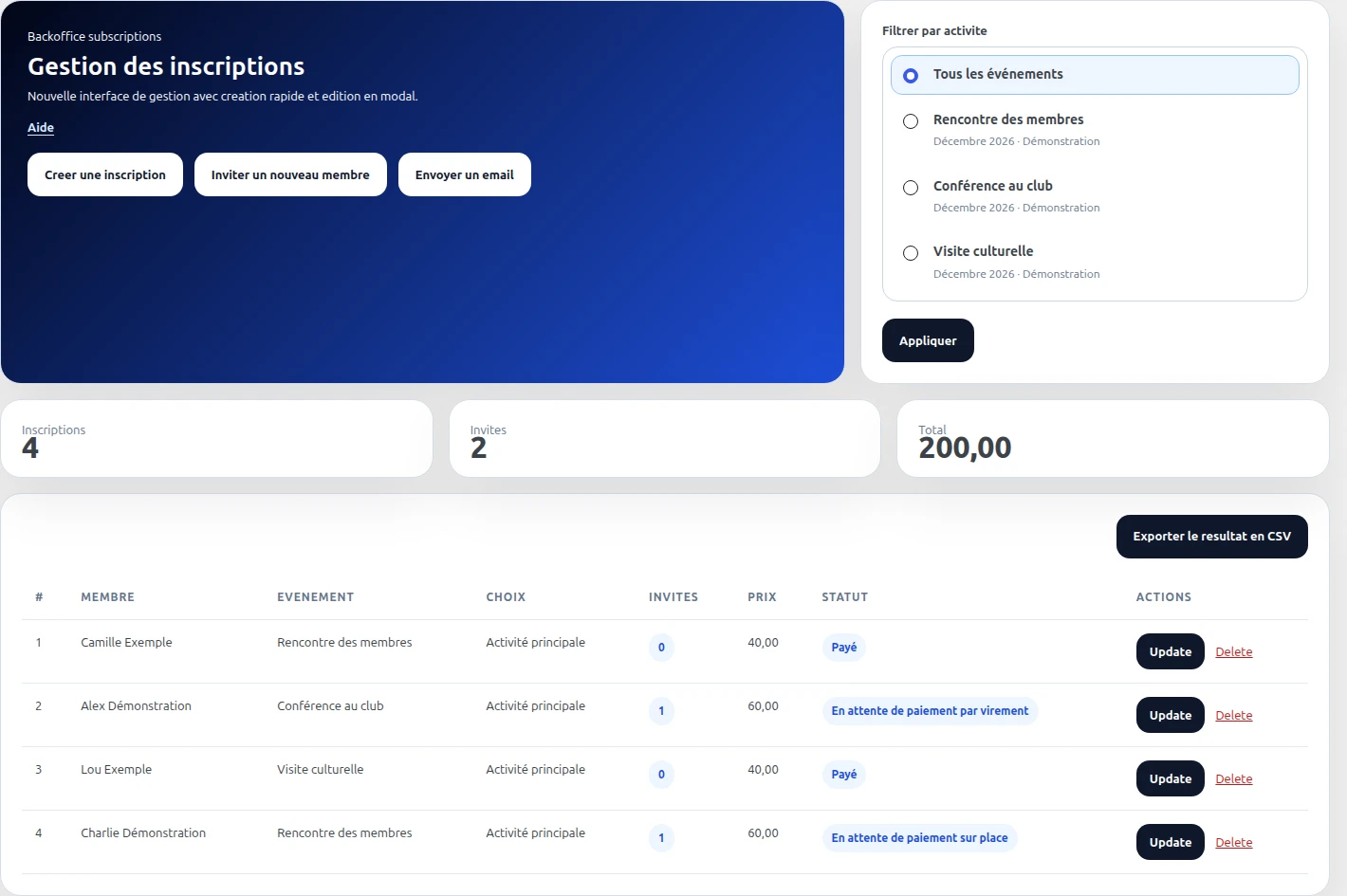
A shared view for preparing activities
Finding participants, their choices and their status in one place.
The table brings together registrations, guests, selected options, amounts and statuses. The filter focuses on one activity, while CSV export makes the list available for organisation. Screenshot of the local administration: names, events, quantities and amounts are fictional and do not represent the club’s actual activity.
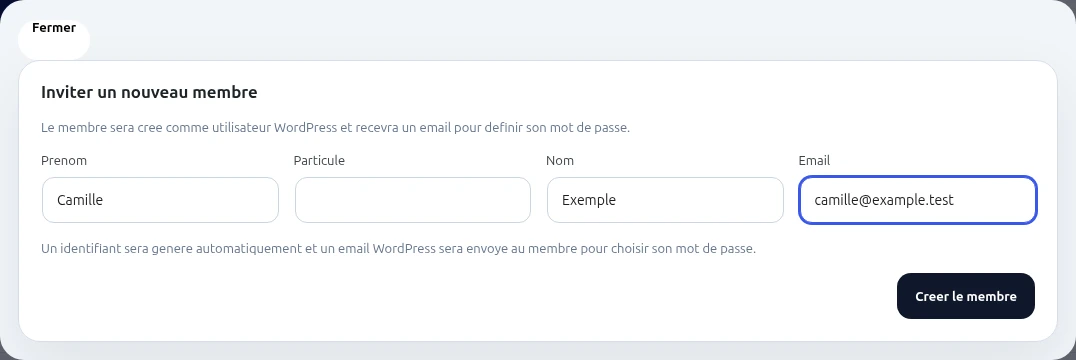
Welcoming a member from the management tool
A dedicated journey to create their access.
The team enters the first name, any name particle, surname and email address. The system creates the account and prepares an invitation for the member to set their own password. Local screenshot of the form, with a fictional identity and address.
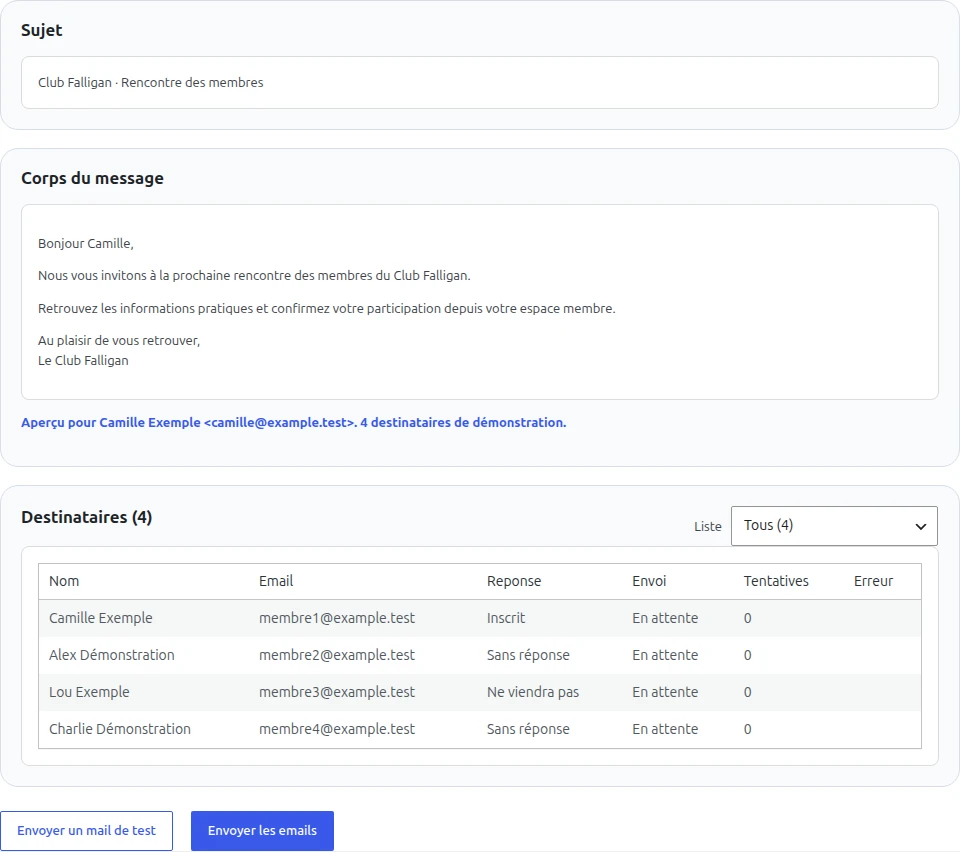
Sending the right message to the right people
Previewing an invitation and choosing its audience based on responses.
The preview shows the subject, message and recipients before sending. The team can select people based on their event response and review attempts and errors. Local screenshot with a demonstration message and fictional names and addresses.
Does your organisation or club need to manage members, events and registrations? Let’s develop your website into a tool suited to your team’s work.
Custom WordPress development